Livetype is used in editing to add titles. For example, you may use it to show the actors names and to show the audience the title of the film. You can change the style, size, shape, size, colour and positioning of the text to suit your own personal preference or to suit the style of the movie you are creating. Its a very good and simple program to use once you get the hang of it!
Friday, 21 January 2011
Editing - Livetype
Livetype is used in editing to add titles. For example, you may use it to show the actors names and to show the audience the title of the film. You can change the style, size, shape, size, colour and positioning of the text to suit your own personal preference or to suit the style of the movie you are creating. Its a very good and simple program to use once you get the hang of it!
Thursday, 20 January 2011
Camera Skills Tutorial
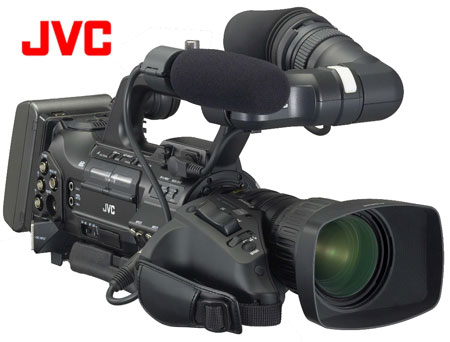
Yesterday I had a camera tutorial as preperation for the main task of creating the two miniute introduction for a thriller film.
The cameras we will be using are very expensive and of professional quality therefore it was important to make sure I learnt how to use the equipment properly, i learned how to correctly insert media cards into the camera so that any filming is captured and stored properly, how to safely mount the camera onto the tripod to achieve different types of shots as well as basic and advanced camera functionalty such as switching between auto focus and manual focus, the zoom function, reviewing clips that have been viewed on camera via the pull out LCD and removing and replacing the battery.
After this tutorial i feel much more confident using the camera and feel yet more prepared for filming.
The cameras we will be using are very expensive and of professional quality therefore it was important to make sure I learnt how to use the equipment properly, i learned how to correctly insert media cards into the camera so that any filming is captured and stored properly, how to safely mount the camera onto the tripod to achieve different types of shots as well as basic and advanced camera functionalty such as switching between auto focus and manual focus, the zoom function, reviewing clips that have been viewed on camera via the pull out LCD and removing and replacing the battery.
After this tutorial i feel much more confident using the camera and feel yet more prepared for filming.
Wednesday, 19 January 2011
TYPES OF SHOTS
Extreme wide shot.
Often used as an establishing shot

Wide shot

Midshot
Shows some part of the subject in more detail while still giving an impression of the whole subject.

Often used as an establishing shot
Wide shot
Midshot
Medium close up
half way between midshot and close up.Close up -A certain feature or part of the subject takes up the whole frame.
Extreme close up - shows extreme detail .
Cutaway- a shot of something other than the current action
Cut in - part of the subject in detail
Two Shot - A shot of two people, framed similarly to a mid shot.
A Canted angle is a good use of shot type in a scary film because its deliberately slanted to one side, sometimes used for dramatic effect to help portray unease, disorientation, frantic or desperate action.
The Skills Audit
.
- FINAL CUT PRO - The software allows users to log and capture video onto a hard drive (internal or external), where it can be edited, processed, and output to a wide variety of formats.
- SOUND TRACK PRO - The main concept of Soundtrack was to allow people who are not professional composers to produce original music for their videos or DVDs
- LiveType - created by apple. creates animated title sequences for video projects.
Skills Audit
While editing the bag swap skit, i I learned skills using three programs, Final Cut Pro - a industry standard video editor made by Apple. Soundtrack pro - the equivalent program for sound and soundtracks and LiveType - a suite for making high versatile titles.
The opening screen of soundtrack pro, showing a new empty project
Screenshot showing the making of the titles for the clip
The inspector in livetype
Effects in LiveType
Final Cut
Clip Sequencer in Final Cut
All the shots imported from the camera into final cut.
After this exersisee i now feel ready and competent in editing clips and peicing shots together as well as constructing and importing sound to match the clips as well as producing and incoporating titles into any projects. Learning this skills has also put some new ideas for the main thriller project into my head.
The Bag Swap
After our first shot of filming a bag swap wasnt as successful as it could of been, we filmed another version. This time we used soundtrack pro to add sound effects, LiveType to add titles as well as Final Cut Pro for editing.
Sound effects: School bell,
Shots:
Editing:
This new clip is two characters which bump into each other and one the characters steal the others bag. Enjoy !
Sound effects: School bell,
Shots:
Editing:
This new clip is two characters which bump into each other and one the characters steal the others bag. Enjoy !
The Bag
Skills Audit
Whilst editing The Bag Swap i learned how to use three important programmes
Final Cut Pro - a professional non-linear editing software application developed by Apple Inc
Livetype - a software program developed by Apple which can be used to create animated title sequences for video projects.
Sound Track Pro - a music composing and audio editing application with over 5000 royalty free professional instrument loops and sound effects created by Apple Inc
At first i found it quite hard to import all the clips into Final Cut Pro and edit as well as make the titles on Live Type butwith abit of practise i become a 'Professional'. I still havnt got the hang of using Sound Track Pro but by the time we are ready to film and edit our thriller opening sequence i should have mastered it
![]() |
This is all the clips which have been imported into Final Cut Pro |
![]() |
| Clip Sequencer in Final Cut Pro |
![]() |
| Final Cut pro as we edit the scenes. It allows you to see the import videos as well as a screen to watch the work you have already edited |
![]() |
| The inspector in livetype which allows you to change the font and colour of the title and add an effect |
![]() |
| This shows the making of the titles for the bag swap using Live Type |
![]() |
| Heres the bar showing the effects which were added to the titles in Live Type |
![]() |
| This is the opening screen of soundtrack pro |
![]() |
| This screen grab shows the Sound Clip and Loop libary in soundtrack |
Subscribe to:
Posts (Atom)